

Role: UI/UX Designer
Type of Project: Solo Project
Duration: 45 hours
Software: Figma, Google Forms, PowerPoint
Ark Wireframe (Fan)
Overview
Ark: Survival Evolved is one of my favorite survival games, but its inventory UI has always had usability and readability issues. It leaves a lot to be desired, and I set out to see whether others agreed with me and what I could do to improve it!
I created a survey for the ARK community that received 21 responses, and I interviewed two less-experienced ARK players to identify UI pain points and confirm my suspicions. I then conducted several user tests with my redesigned wireframe to assess whether my improvements were effective.
I gave my survey to veteran players and ran in-person gameplay tests under a rigid testing structure to see the disconnect between players of all experience levels and the UI.
Identifying Problems and Conducting Research
Conducted user interviews with less experienced players to discover pain points for new users.
Created a survey focused on veterans of the game to uncover issues that users have grown complacent with, forgotten, or that ultimately annoy players.
I posted the survey in ARK communities on Reddit and Discord, and it gathered 21 responses.
Parsed data and findings from interviews and surveys to find solutions and validate/invalidate my possible solutions.
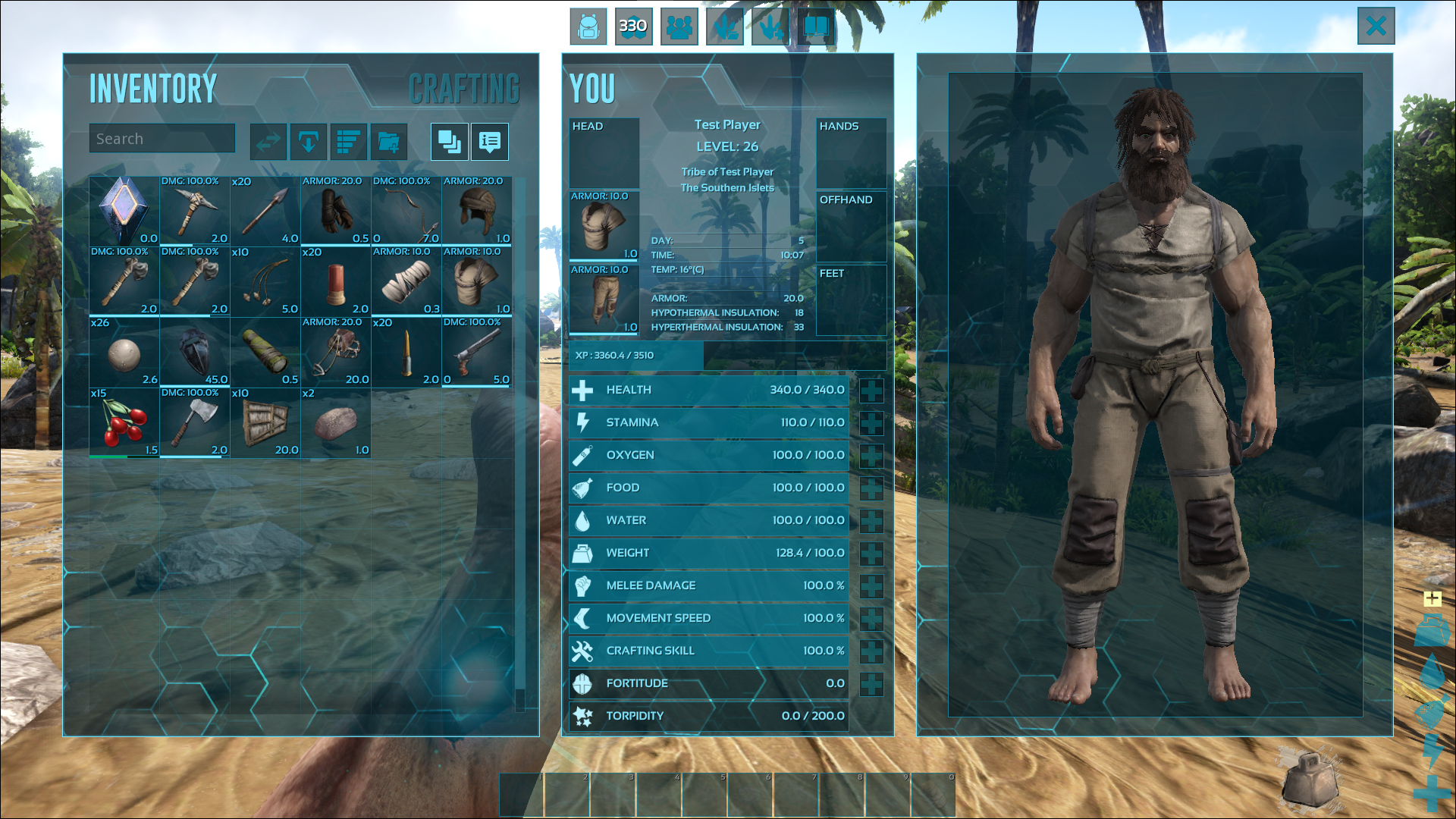
Original Game UI
User Interview Testing Methods
User Interview Findings
Survey Findings
Converting Problems to Solutions
Main Problem Statement
Redesign Ark: Survival Evolved's inventory UI to empower new players to fully utilize available tools while providing veterans with quality-of-life improvements that minimize in-game frustration.
From Pain Points to Goals
Lack of organizational features
Cramped UI
Unclear which items are usable from the Hotbar
Unintuitive organization and sorting features
Give users tools to organize items across various types easily.
Clearly define what can and cannot be used with the hot bar for players.
Develop new signifiers to streamline users' understanding.
User Stories
To better understand the problems I needed to solve and the users I was solving them for, I created user stories that captured their motivations and the reasons behind their desired changes.
(Hot Bar)As a new player learning the game, I want my hotbar to be connected to my inventory so I don’t forget which items I have.
(Feedback) As a new player learning the game, I want visual feedback to show me when and where I can move items to understand how the inventory works.
(Unaware of Inventory Tools) As a new player learning the game, I want to know which tools I have available to make the most of my inventory and minimize frustration.
(Simple Organization) As a mastery-focused player, I want to be able to sort my items quickly so that I can organize and find the ones I need.
Refining the Organizational Experience
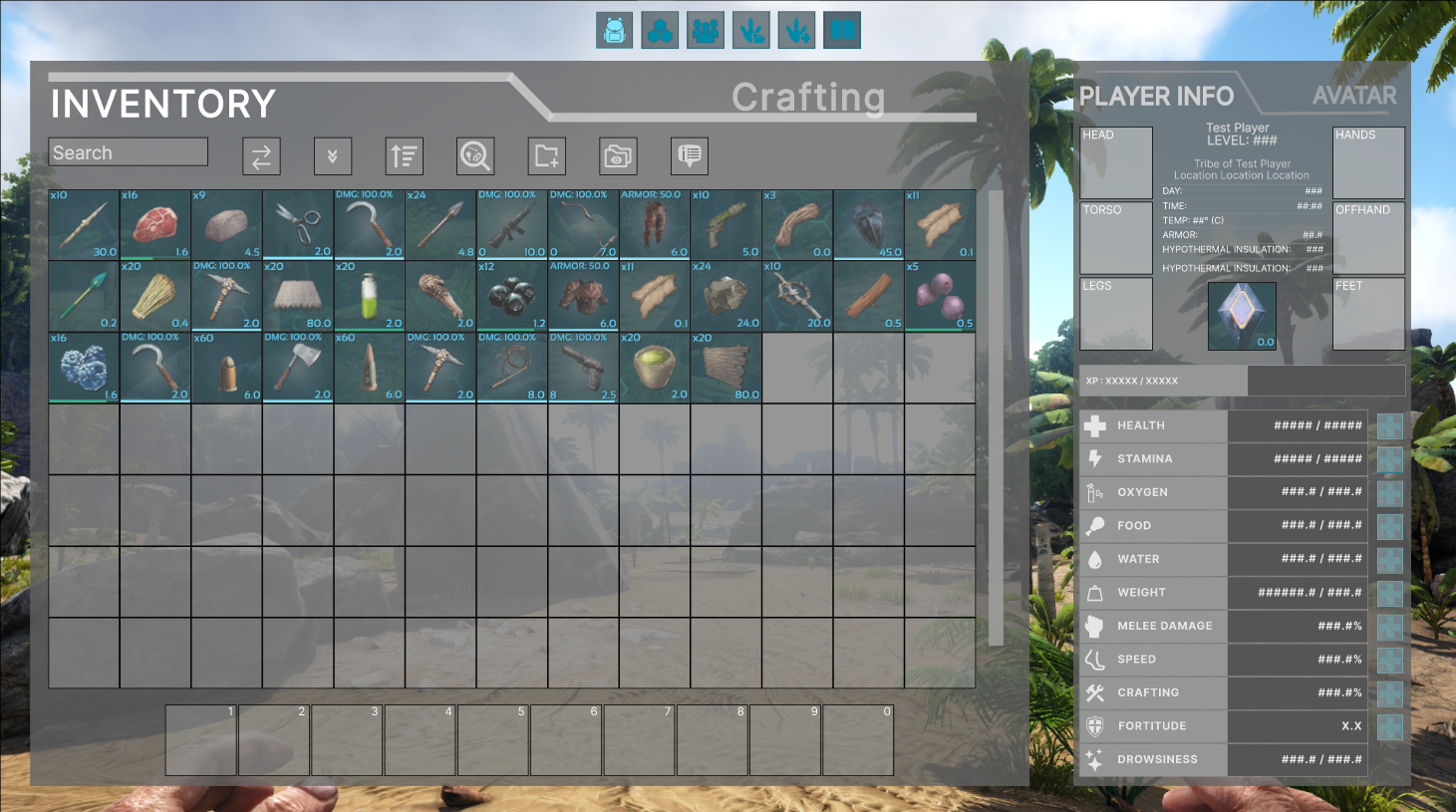
Increasing Inventory UI Space
Problems:
In-game UI for inventory required the user to scroll if they had many items.
Elements were squashed together, and the UI felt cramped.
Solutions:
Consolidated the character view window and character stats.
Increased the size of the inventory space.
Sorting and Filtering
Problems:
Limited sorting options and irrelevant sorting options
No filtering options for items.
Solutions:
Added the ability to sort options by item type.
Added the ability to filter items by type.
Item and Hotbar Confusion
Solutions:
Added an arrow showing where the item would be placed in the inventory slots depending on where the player would put it.
I made the hotbar turn red, and the item and corresponding slot slowly blinked the same color.
Problems:
No signifiers for where your items will be moved to when moving them in your inventory.
No signifiers that tell players what items can be used in the hotbar or offhand slot.
Ending Notes
The ARK project taught me that a clean, elegant fix is often more valuable than a complete overhaul, both for solving player pain points and reducing the team's workload. I also learned that new users are surprisingly effective at identifying systemic issues precisely because they haven't adapted to its quirks, whereas long-time users require deeper investigation to uncover frustrations they've simply learned to live with.
Check out my other projects!